Shopfloor management & shopfloor control – detailed planning of your manufacturing process
Shopfloor control is an essential component of futuristic manufacturing planning. The objective of fine control is to implement the planned manufacturing program, i.e. to plan production orders for products and intermediate products on the basis of the key dates defined by the ERP system.
The aim is to optimize the order planning, taking into account the machine, workforce and tool resources. Detailed shopfloor control using software allows the use of resources to be sustainably optimized throughout the value creation chain. This often helps in streamlining processes, reducing efforts and set-up times as well as cutting down costs.
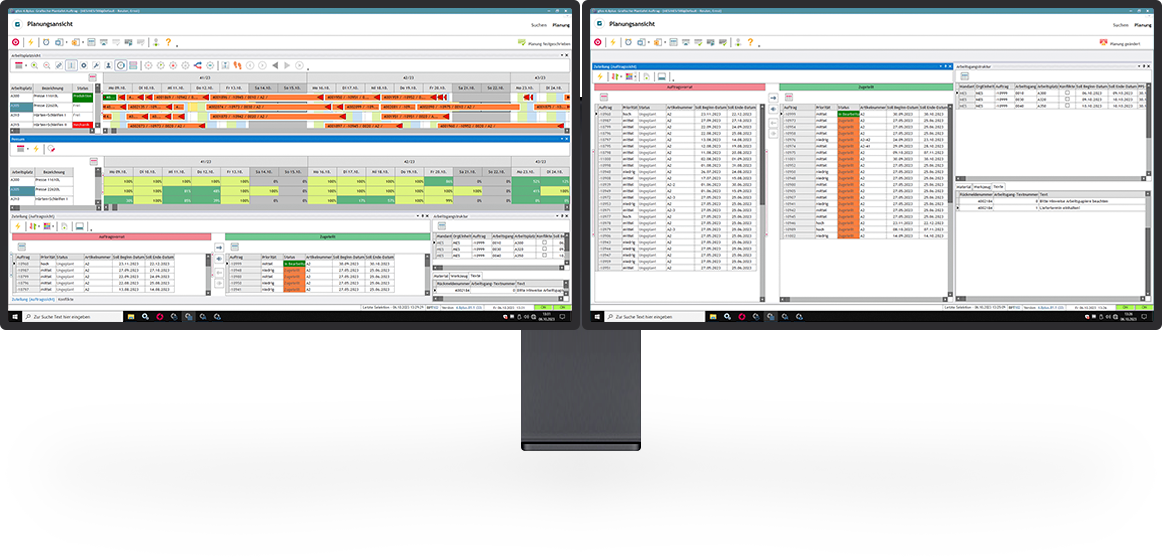
An extremely important element of shopfloor management is the graphical scheduling board. This is an interactive tool for visualizing the entire production process. The graphical scheduling board is a tool that can operate more efficiently and flexibly than centrally organized PPS/ERP/SCM systems. The tool is intuitive and easy to use.
Whether it is changes to the planning data, events on machines or deviations of workstations from the target state (ideal state), the graphical scheduling board enables quick and efficient responses to such situations. The planner can identify potential conflicts such as lack of capacity, missed deadlines or workforce shortages at a glance and can respond accordingly. Discover the numerous value-adds that shopfloor control using software from GFOS will bring to your company.
View all references



Benefits of our shopfloor control
Optimum utilization of resources
Shopfloor control is used to plan manufacturing processes such that materials, people and machines are used in the best possible manner.
Graphical scheduling board
The graphical scheduling board enables clear and concise visualization of even complex production processes. Thanks to the multi-window support, the graphical user interface of the scheduling board can also be configured and displayed completely individually for different screens.
Reduction in set-up times/throughput times
Efficient process planning minimizes the set-up times and accelerates the completion of orders. This makes it possible to improve delivery reliability and adherence to delivery times, which in turn increases customer satisfaction.
Optimization of workforce deployme
Shopfloor management makes it possible to deploy employees in such a way that individual skills and qualifications are put to use in a more advantageous manner.
Increase in flexibility
In case of sudden changes or failures, resources can be quickly and efficiently reallocated without affecting other processes.
Maximum transparency
Shopfloor control makes it possible to trace production processes in greater detail. This creates transpareny in processes and provides a solid basis for decision-making in case of planning conflicts.
Shopfloor control – flexible algorithms for precise planning
When designing manufacturing processes, the planning algorithm of our shopfloor control is capable of taking a wide range of influencing factors into account. This makes it possible for the program to design and recommend planning solutions independently on the basis of the available information, making optimum use of the available resources.
The software can use a wide variety of methods for this purpose:
- Definition of production blocks
A production block is a defined time interval (day, week, month). A production block only contains one operation from one order. This gives the planner maximum possible scope to optimize the planning manually within the production block. At the same time, it is ensured that the predecessor and successor relationship is maintained. - Definition of workstation alternatives
When determining a solution, the shopfloor management takes into account alternatives within the workstation groups as well as individually defined article-relevant options. This ensures that the best possible optimum planning with high machine utilization. - “Freezing” of areas
When an area is frozen, the sequence of work steps in this area is no longer changed in the subsequent planning runs, and only the scheduling is updated. A frozen area can either be automatically defined for each workstation using existing rules (time, number) or can be manually set by the planner in the graphical scheduling board. This function supports material availability and provision, especially at start workstations.
Equipped with the right skills, our GFOS software can consistently optimize both simple and complex production processes in your company according to the efficiency criteria and plan the available resources with foresight.
Simulation of manufacturing scenarios with the help of shopfloor management
The software can map actual planning processes as well as simulate theoretical scenarios. The user can browse through a wide variety of scenarios in the simulation mode, e.g. change the available capacity (adding additional shifts, planning overtime, etc.) or use alternative machines.
- Unmanned production (e.g. in the night shift) with a specified quantity of input material
- Outside production, or operations processed within the scope of outside production
- Set-up times or changes to set-up times per operation
Timely detection of planning conflicts
Planning conflicts are visualized on the work process beam in the Gantt as well as listed in a separate conflict view for each workstation and category. Conflicts can, for instance, be deadline violations or lack of capacity. Similarly, our shopfloor control can also issue warnings if a time buffer has been used or if there has been a rescheduling to another workstation. This provides clarity at all times about actual, acute conflicts as well as for any potential for conflicts along the manufacturing chain.
Integration of other GFOS modules
Thanks to the modular structure of our business solutions, the module for shopfloor control can be linked to other GFOS competence fields. In this area, experience has shown that interfaces to the topics of employee scheduling and maintenance management software particularly in demand:
Once a planning result has been saved, the human resource requirements are sent for employee scheduling. This ensures that a defined minimum requirement is covered, taking into consideration the necessary qualifications, and at the same time, it is possible to respond flexibly to the requirements of the current manufacturing planning.
If, for instance, the machine is blocked due to maintenance, this reduces the available capacity. With the help of our software, such downtimes are directly taken into account and compensated for by means of appropriate options in the production process.
Functions of shopfloor control
Prioritization of processes
Simple prioritization of orders that are critical for business for accelerated completion without affecting other manufacturing planning
Simulation of manufacturing planning
Simulative planning of various production scenarios to compare a wide range of manufacturing processes and their opportunities and risks.
Identification of planning conflicts
Shopfloor control for automated detection of relevant planning conflicts during production and notification to the responsible decision-makers
Integrated alarm management
constant monitoring of all planning specifications and visualization of deviations or automated notifications (depending on the configuration)
Detailed evaluations
Flexibly configurable and schedulable evaluations for displaying various parameters (capacity utilization/resource deployment)
Successes with the Shopfloor control from GFOS
ARI Armaturen Albert Richter GmbH & Co. KG
SGL Carbon GmbH

Vilsa-Brunnen Otto Rodekohr GmbH
Would you like to learn more about GFOS software or receive additional information? Please feel free to contact us so we can discuss your needs together.
Contact